
Applicable school profile
Confirm phase, school type, early-years and post-16 provision before operational records are shown.
For School leaders, Ready administrators
Product walkthrough · Ready
Organise school evaluation, improvement actions and supporting sources, with a clear distinction between finishing work and knowing its impact.
These product screens use demonstration records. Your school’s access and connections depend on its licences and setup.
Explore Ready
School examples and feature detail.
Area 1 of 7
Ready
Build a clear school-authored account of the current position: the applicable provision, what is working, where concerns remain and what needs another look.
Ready is included in the full suite. Explore these features in a demonstration; confirm school setup, availability and the agreed features before activation.
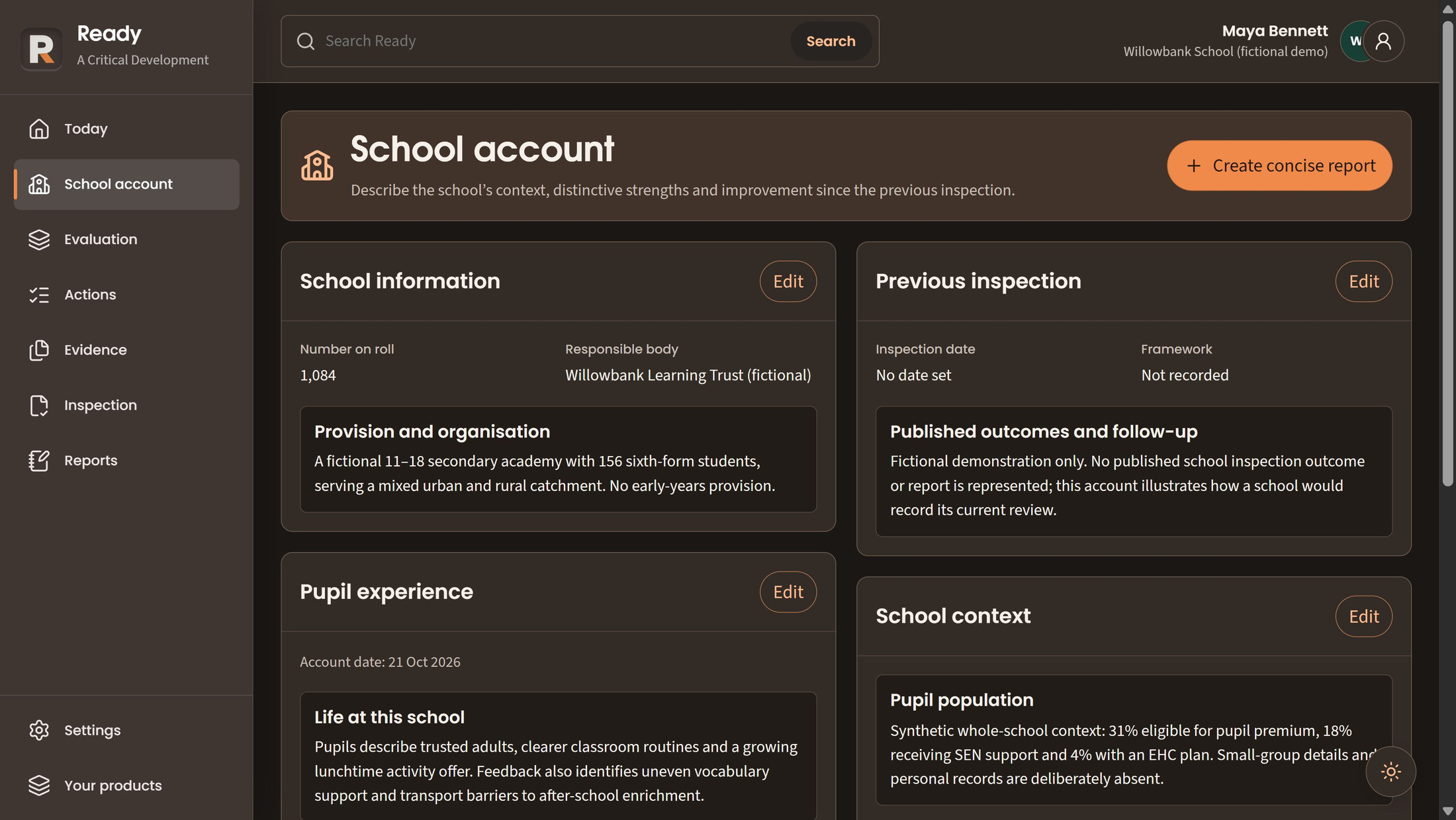
Record phase, school type, early-years and post-16 provision before opening the operational records. This determines the applicable working context; confirming a profile is not a compliance judgement.
Keep summaries, strengths, concerns, uncertainty and review dates within the permitted evaluation area. Staff make and explain the judgement, with room for incomplete or conflicting information rather than a calculated grade or quality score.
Record dated pupil, staffing, community, provision and previous-inspection context separately from area accounts. School-wide access is required. This is an account of the school, not pupil casework or automatically inferred cohort statistics.
School judgements remain human. Ready does not calculate an inspection grade or certify that practice meets a standard.
Choose a numbered marker to look closer.
Record provision in the school's own words
Keep previous-inspection context separate
Ready
Make the intended pupil benefit clear, agree who will act and keep the work visible without treating completion as evidence of impact.
Ready is included in the full suite. Explore these features in a demonstration; confirm school setup, availability and the agreed features before activation.
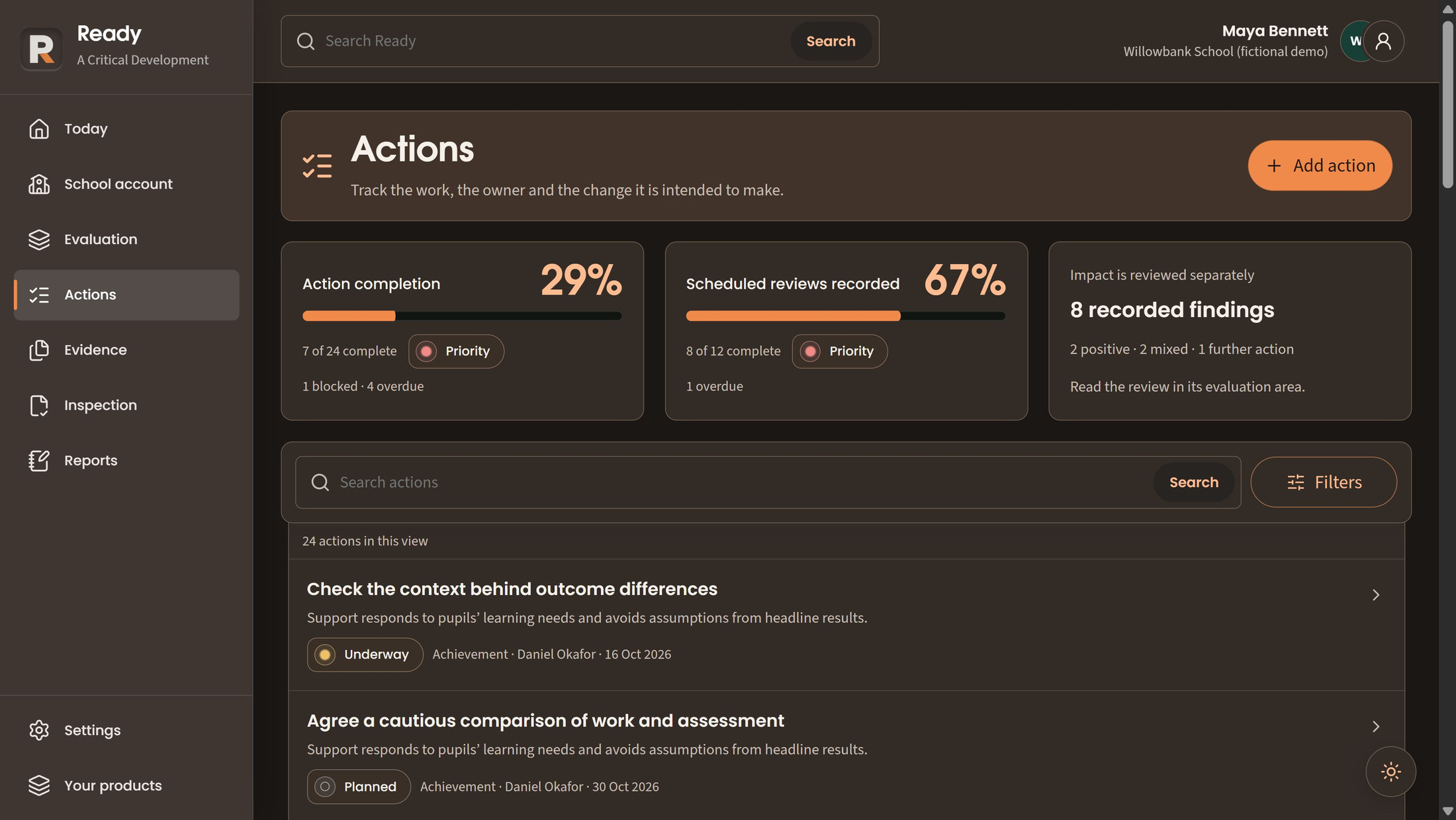
Give a school-authored priority its intended benefit, owner and date, then track actions as planned, underway, blocked, completed or cancelled. Assign an area lead from current internal school members with existing access. Naming a lead grants no new access.
Today keeps action completion, scheduled reviews and information checks distinguishable, with definitions and date-based status. Search returns only records and labels already visible to the reader; hidden areas, records and counts stay hidden.
A warning helps you keep an unfinished form open while making related choices. Save before leaving the page; unsaved work is not available offline. With both products licensed and configured, WorkPane can show your permitted Ready summary for the current cycle.
Due-date status and completion are working measures, not an effectiveness score, inspection grade or compliance certificate.
Choose a numbered marker to look closer.
State and responsibility stay with the action
Completion and impact remain distinct
Ready
Keep the source, its owner and its limitations close to the account it supports. Make review decisions explicit.
Ready is included in the full suite. Explore these features in a demonstration; confirm school setup, availability and the agreed features before activation.
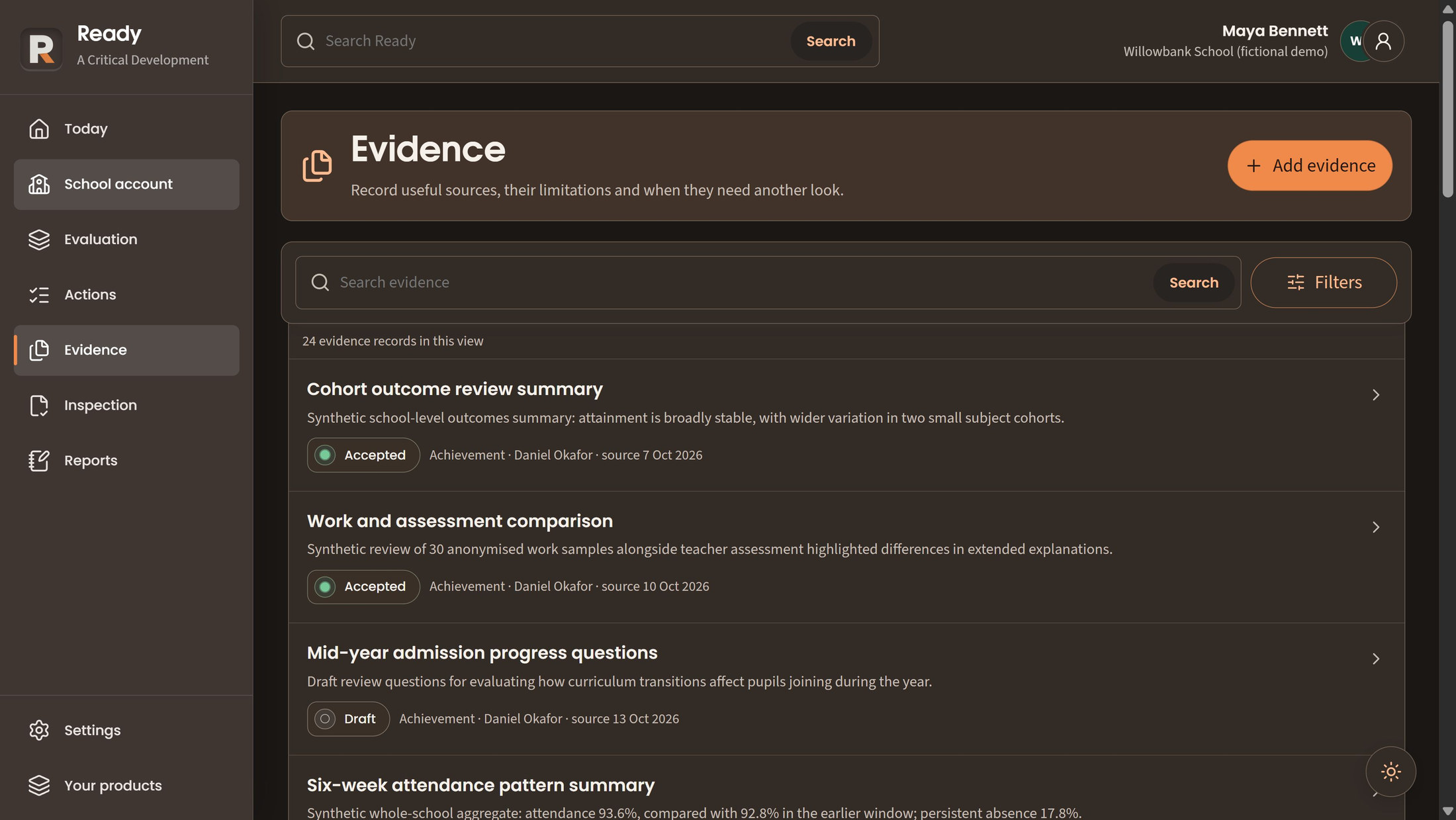
Retain a secure document link or source summary with dates, owner, limitations and review state. Ready records the reference; it does not fetch or evaluate private external documents on the school's behalf.
Submit a source for human acceptance, clarification or withdrawal. Material changes remove its accepted status so the changed information can be considered again. Acceptance records a review decision, not a guarantee of effective practice.
Link only readable, non-withdrawn evidence within the relevant evaluation area. Access to the source remains separate from its presence in a list or account; a link never grants permission to inspect a private document.
Evidence presence alone does not establish quality, compliance or impact. Keep the recorded limitation and human interpretation visible.
Choose a numbered marker to look closer.
Acceptance is recorded
A draft remains visibly different
Ready
Return to the intended benefit, record what has changed and retain uncertainty. Use authoritative guidance and published examples with their context intact.
Ready is included in the full suite. Explore these features in a demonstration; confirm school setup, availability and the agreed features before activation.
Record a dated qualitative finding separately from action completion. Explain what is known, what remains uncertain and what should be checked next. A finding is the school's descriptive judgement, not causal proof or an inspection score.
Work through applicable topics and standards with an account, linked sources and next review date. Explain any not-applicable state. Marking an item reviewed does not mean the standard is met; material account changes reopen the review.
Read short summaries alongside official references. Published examples retain attribution, actual area grade, dates and framework context, with separate adaptation prompts. They are selected examples, not representative samples or outcome guarantees. Content editions are identified; later editions do not silently replace the school's work.
The official source remains authoritative. Ready is not endorsed by Ofsted and does not predict inspection outcomes.
Ready
Know who holds each applicable item, how it can be reached and what is still unknown. Keep practical call preparation alongside that picture.
Ready is included in the full suite. Explore these features in a demonstration; confirm school setup, availability and the agreed features before activation.
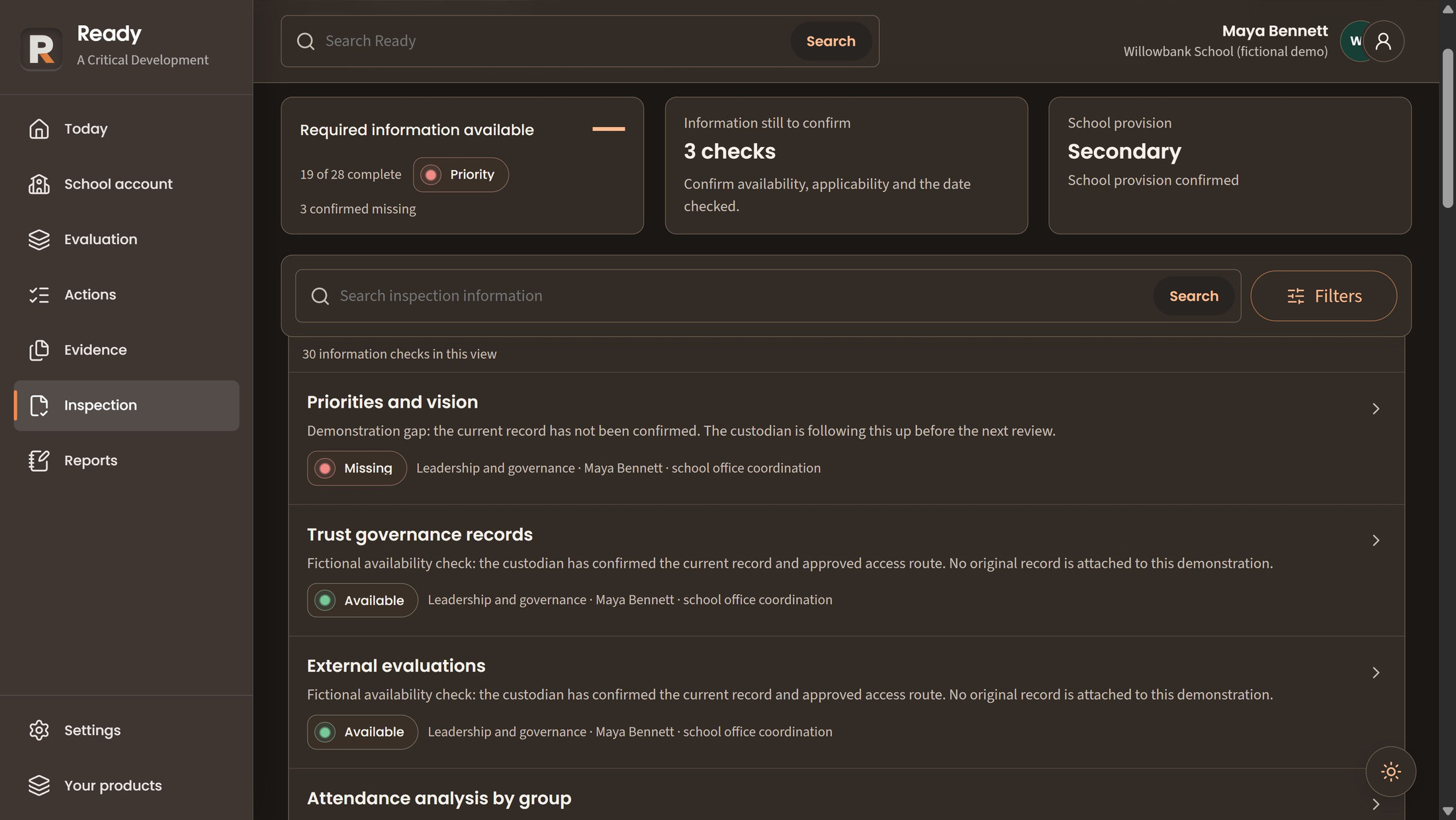
Record the custodian, access route, confirmation date and missing or unknown state for applicable inspection information. Available means the school has confirmed the route, not that an inspector has approved it. Restricted checks do not expose ordinary free-text notes.
Keep attendees, arrangements, changes, questions, support and professional contact details in a school-wide record. The relevant school-level permission is required. This prepares the conversation; it is neither a safeguarding case record nor a portal submission.
Enter the notification date the school has received, separately from the call date and planning record. It is a manual record: Ready does not detect an inspection or automatically notify others.
Keep sensitive information with the authorised owner and access route. An index entry is not permission to open its underlying record.
Choose a numbered marker to look closer.
A missing item remains explicit
An available item keeps its custodian
Ready
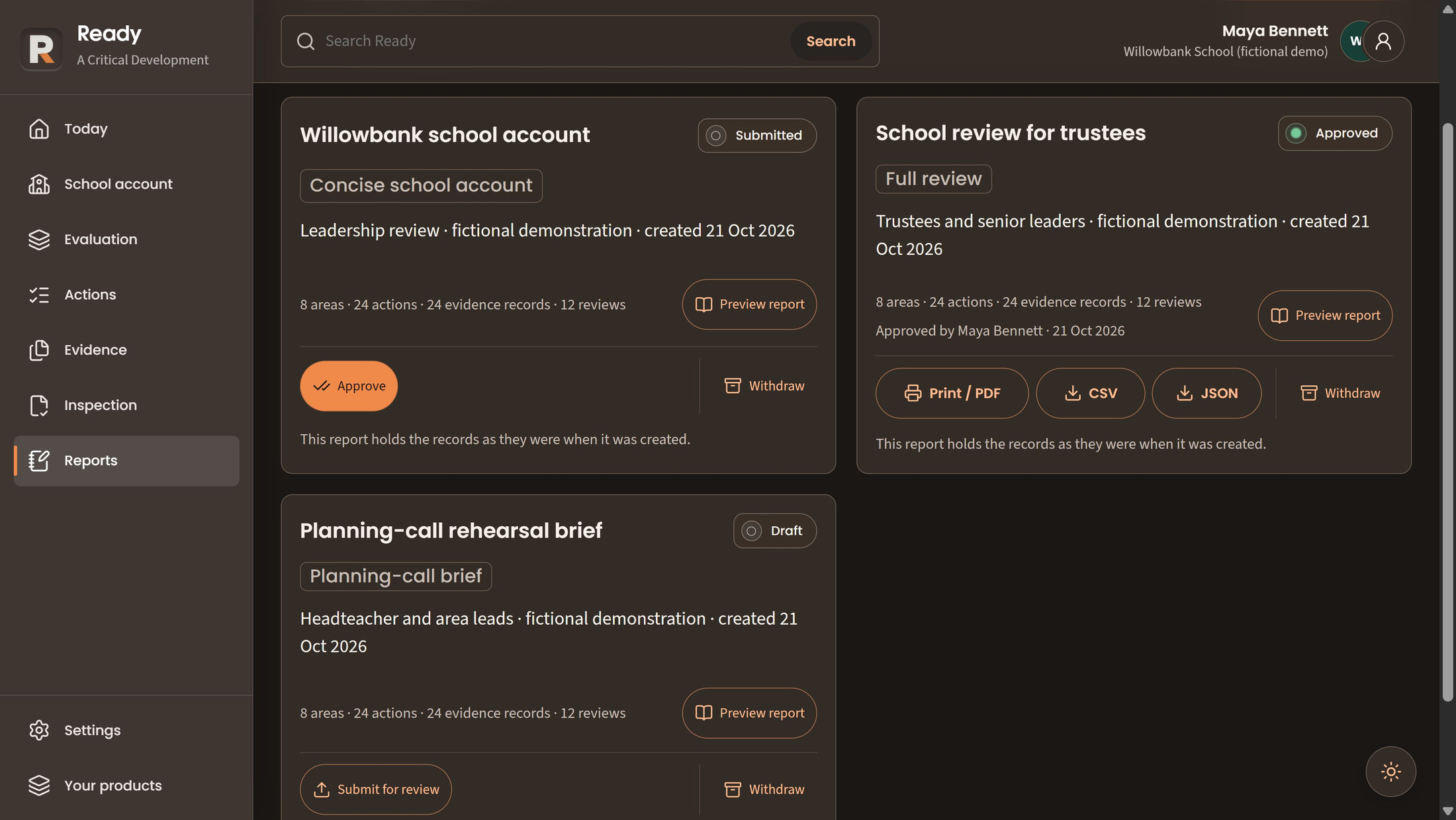
Choose a format for the audience, preserve the account being reviewed and make the output a deliberate authorised step.
Ready is included in the full suite. Explore these features in a demonstration; confirm school setup, availability and the agreed features before activation.
Prepare a full report from records visible to its author, or choose a concise school account using permitted context. The report keeps its frozen snapshot through review; later changes need a successor. The concise format excludes the inspection-information index.
A planning-call brief combines permitted school context, arrangements and inspection-information availability. It requires both context and planning-call access, keeping the brief within the information its author can use.
Submit the report for approval by a separately designated colleague. Sensitive decisions require current verified access. Later use rechecks source access and withdrawn material; approval, preview and export remain separate permissions.
Inspect the exact frozen report before creating an authorised output. Current source permissions still apply. Generating, approving or exporting a report does not send it to Ofsted or any other external recipient.
A frozen report preserves what was reviewed. It does not make later changes, source withdrawals or access decisions irrelevant.
Choose a numbered marker to look closer.
Submitted is different from approved
Preview the report before output
Output has its own controls
Ready
Begin the next review deliberately. Decide what carries forward, retain earlier context and reconcile changes before they overwrite another person's work.
Ready is included in the full suite. Explore these features in a demonstration; confirm school setup, availability and the agreed features before activation.
Review explicit carry and reset choices before archiving the previous cycle and starting its successor. School-wide authority is required; conflicting changes need a fresh preview. Retained closed-cycle snapshots remain readable only under current source and record permissions.
An earlier version helps you follow how a record developed. Repeating the same save attempt records one change. If another person has edited the record, review the conflicting edits before saving again. This is a record of school work, not external certification.
Archived information remains subject to current access and school policy. The archive is not a promise of indefinite retention.
Find the detail
Browse by school job, feature or the people using it.
Features 28
No matching features. Try a broader term or clear the filters.
Ready is included in the full suite. Explore these features in a demonstration; confirm school setup, availability and the agreed features before activation.
Confirm phase, school type, early-years and post-16 provision before operational records are shown.
For School leaders, Ready administrators
Keep school-authored summaries, strengths, concerns, uncertainty and review dates by permitted evaluation area.
For Area leads, Senior leaders
Record dated pupil, staffing, community, provision and previous-inspection context separately from area records.
For Headteachers, Senior leaders
Ready is included in the full suite. Explore these features in a demonstration; confirm school setup, availability and the agreed features before activation.
Record intended pupil benefit, owner and date for a school-authored priority.
For Senior leaders, Area leads
Track planned, underway, blocked, completed or cancelled actions with intended outcomes and due dates.
For Action owners, Improvement leads
Assign a current internal school member with existing area access as the area's named lead.
For Designated head/lead assignees
Show action completion, scheduled reviews and information checks with counts, definitions and date-based status.
For Leaders, Action owners
Search the records and labels currently visible in the user's authorised workspace.
For Ready users
Warn before discarding changed forms and retain a parent draft through nested choices.
For Record authors
Expose a current-cycle summary of permitted Ready work through the separate shared summary contract.
For Staff using both products
Ready is included in the full suite. Explore these features in a demonstration; confirm school setup, availability and the agreed features before activation.
Retain a secure document link or source summary with dates, limitations, owner and review state.
For Contributors, Area leads
Submit sources for named acceptance, clarification or withdrawal; material changes remove accepted status.
For Evidence reviewers, Contributors
Link only readable, non-withdrawn evidence within the relevant evaluation area.
For Area leads, Reviewers
Ready is included in the full suite. Explore these features in a demonstration; confirm school setup, availability and the agreed features before activation.
Record dated qualitative findings and uncertainty separately from action completion.
For Reviewers, Improvement leads
Review applicable topics and standards with an account, sources, next review date and explained N/A state.
For Area leads, Evaluation reviewers
Consult area-specific official references and original product summaries alongside evaluation work.
For School leaders, Area leads
Read attributed examples with actual area grade, dates, framework context and separate adaptation prompts.
For Leaders, Governors with permitted views
Ready is included in the full suite. Explore these features in a demonstration; confirm school setup, availability and the agreed features before activation.
Record custodian, access route, confirmation date and known missing/unknown states for applicable information.
For Inspection coordinators, Area leads
Keep arrangements, attendees, changes, questions, support and professional contact details in a school-wide record.
For Headteachers, Inspection coordinators
Record the received notification date separately from the call date and planning record.
For Inspection managers
Ready is included in the full suite. Explore these features in a demonstration; confirm school setup, availability and the agreed features before activation.
Prepare a report from the records visible to its author and preserve the snapshot through review.
For Report preparers, Approvers
Produce a concise report format using permitted school context and operational records.
For Senior leaders, Report preparers
Prepare a bounded call brief combining permitted school context, arrangements and inspection availability.
For Headteachers, Inspection coordinators
Submit reports for independently designated approval and recheck access/withdrawn sources on later use.
For Report reviewers, Approvers
Preview the exact frozen report and create an authorised output without silently sending it.
For Report readers, Exporters
Ready is included in the full suite. Explore these features in a demonstration; confirm school setup, availability and the agreed features before activation.
Preview explicit carry/reset choices, archive the previous cycle and start its successor in one guarded operation.
For School-wide cycle managers
Read retained closed-cycle snapshots under current source and record permissions.
For Authorised leaders, Reviewers
Persist record history, current revision and idempotent command identity together.
For Record authors, Auditors
Make it work for your school
Explore another app, check the complete annual price, or arrange a conversation about your school’s needs and Wonde MIS integration.